 Simulation Software for Fluids and Solids
Simulation Concrete Hydration - Thermal Analysis


If you want to perform a thermal analysis of concrete hydration using simulation, our meshless CFD software NOGRID points is a great choice. Based on the geometrical model - which can either be imported from your CAD or created using our CAD preprocessor COMPASS - you can quickly generate a computational model of a specific geometry. Compared to mesh-based methods, this process is significantly faster and allows you to evaluate the thermal characteristics in advance.
NOGRID points shows how the heat is transferred either through heat conduction, heat radiation or convection by means the flow of a fluid. It also allows for the coupling of all types of heat transfer mechanisms. The example below shows the temperature development during a concrete hydration process. The reaction with water is referred to as "hydration" and involves multiple chemical reactions often occurring simultaneously. As the reactions proceed, the hydration products gradually bond the individual sand, gravel particles, and other components of the concrete together, forming a solid mass.
In this thermal modeling/thermal simulation we used a time dependent heat source, and the resulting temperature evolution is shown in Figure 4. The initial and ambient temperatures were set to 15 °C.
This model provides valuable insight into the concrete hydration process and can help improve your design in terms of efficiency efficiency and cost. If anything is missing for your specific needs, please let us know - we can easily implement additional requirements.
NOGRID points can perfectly be used for design and problem solving for all kinds of thermal processes. It allows for accurate prediction of thermal homogenizing, temperature gradients, and the cooling or heating rates. NOGRID points helps to understand the flow by visualizing mass, momentum, and heat transfer in both single-phase and multi-phase systems. You receive integral quantities which you can use to analyze the efficiency of heat fluxes.
Capabilities of NOGRID points CFD software
NOGRID combines capabilities to handle free-surface flow and moving parts within the domain and allows the simulation of any conceivable geometry and operating mode, such as
- fully 3D computation solving the complete Navier-Stokes equations
- easy and intuitive setup for thermal analysis cases
- freely definable material properties by equations or curves
- evaluation of chemical reactions and corresponding heat source terms
- open or closed domains, including inflow and outflow areas (non-batch mode)
- moving of parts within the concrete for homogenization purposes
Why choose Nogrid?
NOGRID provides professional CFD software for the simulation of fluid flow, heat and mass transfer, and chemical reactions. Its efficient modelling workflow helps engineers analyse flow behaviour, evaluate designs and make informed decisions without creating a conventional volume mesh.
Faster model preparation
With NOGRID, only the geometry boundary needs to be meshed. The finite points inside the fluid domain are generated automatically according to user-defined settings, both at the start of the simulation and during the calculation.
This approach reduces preprocessing effort and makes it easier to prepare complex geometries and cavities for simulation.
Efficient CFD workflow
The modelling process follows four straightforward steps:
Build the geometry. Mesh the boundary. Define the simulation. Start the calculation.
NOGRID is designed to provide short computation times, including for applications involving complex cavities. Engineers can use the resulting data to examine flow distribution and other relevant flow characteristics.
Better insight into fluid-flow processes
CFD solves the fundamental equations governing fluid flow. NOGRID software enables engineers to predict and analyse the behaviour of fluids and related physical processes before or alongside physical testing.
The simulation results can support:
- evaluation and comparison of design alternatives
- optimisation of construction and operating parameters
- improved planning reliability
- reduction of development time and testing effort
- faster progression from design to market or operation
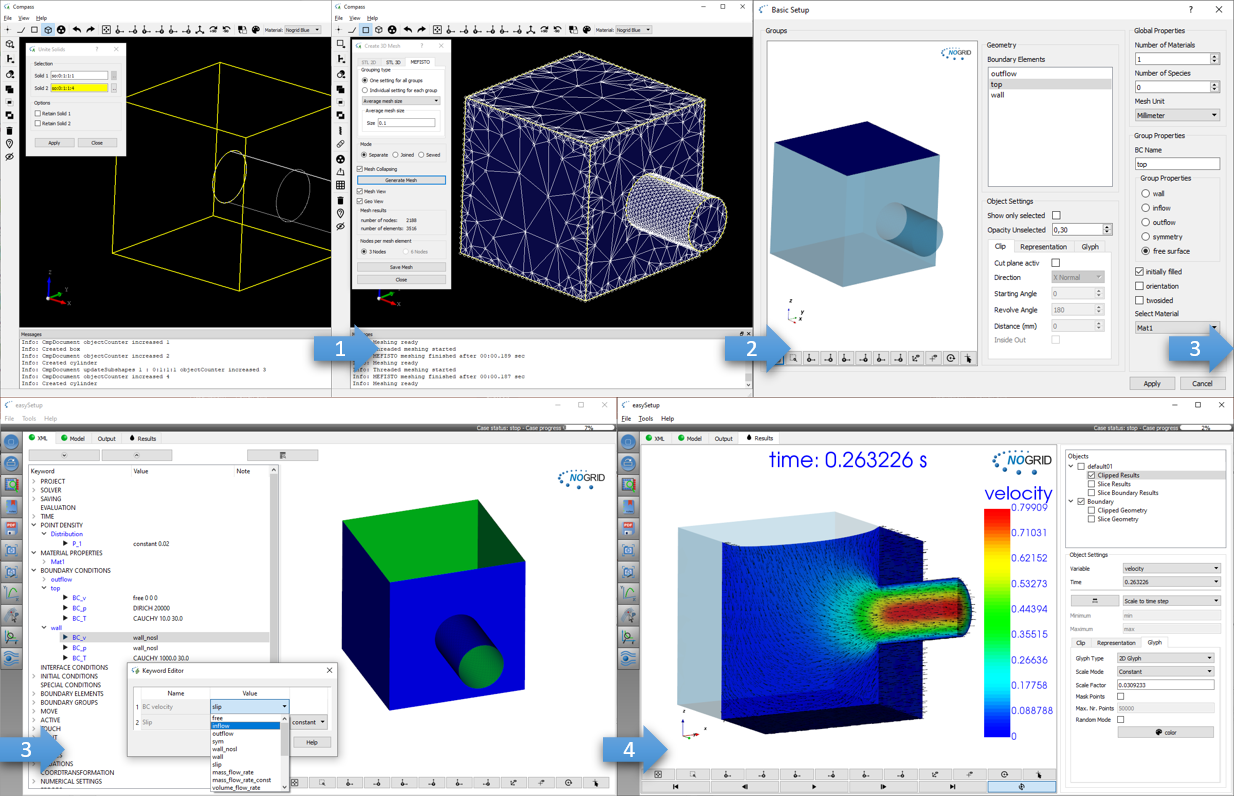
Steps from geometry generation to simulation results
TRAINING
Our two-day training courses teach participants how to set up, run and evaluate simulations efficiently with NOGRID CFD software. The courses include practical guidance for handling different types of simulation cases.
For more details please refer to Training Courses →
Technical Support
Professional support is available from the beginning of your work with NOGRID. Our technical team assists users by telephone and email with software operation, case setup and simulation-related questions.
For more details please refer to Software Support →
Simulation Service
When internal time, expertise or resources are limited, NOGRID can support your project with individual numerical simulation services. Our engineers develop and evaluate CFD models based on the specific requirements of your application.
For more details please refer to Software Support →